


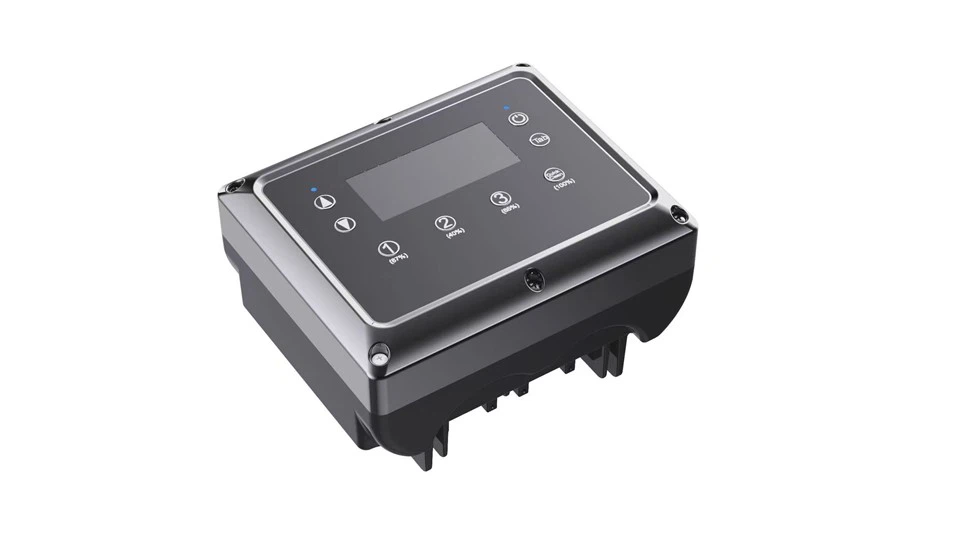
Technical Specifications
|
Model |
Power |
Size |
Rated Current |
Input Voltage |
Output Voltage |
Category |
Input Frequency |
Output Frequency |
Pressure Sensor |
|
VFA-18LM |
0.75KW |
186*154*116mm |
4.8A |
1×220V |
1×220V |
Single-phase in and Single-phase Out |
50/60Hz |
20-50/60Hz |
4-20mA +24V 10bar |
|
1.1KW |
210*173*151mm |
7A |
|||||||
|
1.5KW |
210*173*151mm |
9.6A |
|||||||
|
2.2KW |
210*173*151mm |
11.5A |
|||||||
|
3KW |
250*240*170mm |
13A |

Products Feature
- This inverter is specially designed for swimming pool pumps and has speed adjustment and timing functions. it adopts the industry leading technique SPWM and pressure transmission technique, detects actual pipeline pressure change and controls the rotation speed of the pump.
- The operation of this device is very easy, all functions can be finished by parameters setting , no need any professional staffs to debug.
- This VFD inverter is high-efficient , it can save water and electricity up to 20%~60% compared to traditional water supply system.
- Soft starting and stopping, constant water pressure prolong the service life of the pipe Network and make the water usage comfortable and enjoyable.
- The range voltage is wild, it can work stably in areas with large voltage fluctuation.
- The installation is very easy with direct screw thread, it can be used different kinds of water pumps and thus reduce extra costs.
- The LCD display makes it quick and easy to check and set the actual pressure value.
Application
- Tap water booster system
- Household and residential water supply system
- Swimming pool water supply system
- Commercial water supply system
- Factory dormitory water supply system
- Industrial water circulation system
Technical Parameters
|
No. |
Product Specification |
0.75KW |
1.1KW |
1.5KW |
2.2KW |
3KW |
|
1 |
Input Power |
Single-phase AC Power supply |
||||
|
2 |
Input Voltage |
110VAC or 220VAC |
||||
|
3 |
Allowed Voltage Fluctuation |
80V~140V(110V) OR 160V~260V(220V) |
||||
|
4 |
Input Frequency |
50/60Hz |
||||
|
5 |
Output Voltage |
110VAC or 220VAC |
||||
|
6 |
Load Type |
Pump |
||||
|
7 |
Output Frequency Range |
20-50/60Hz |
||||
|
8 |
Pressure Sensor |
24V, 4-20mA(10bar) |
||||
|
9 |
Pressure Setting Range |
0.5~9.0bar |
||||
|
10 |
Pressure Tank Setting Requirements |
Required not less than 2 liters inflatable pressure water tank(Preset pressure=60% of the setting pressure) |
||||
|
11 |
Temperature Range |
0~+40℃ |
||||
|
12 |
Medium |
Clean water within the temperature range of 0~+100℃ |
||||
|
13 |
Required Pressure When Self-starting |
When the factory setting pressure is less than 0.3 bar |
||||
|
14 |
Installation |
Make sure the grounding is appropriate and reliable before using. |
||||
Timing and speed control function description

Key Description
①ꓥ key for value addition. The set value for time can be increased in the time setting and the set value for speed can be increased in the speed setting.
②ꓦ key for the value minus. The set value of the time can be decreased in the time setting and the set value of the speed can be decreased in the speed setting.
③Gear/Time Period "1" /"2" /"3" keys. In automatic mode, you can adjust and view the time period parameters, and in manual mode you can adjust the gear and gear parameters.
④"Backwash" - gear/exhaust key. In automatic mode, you can set the exhaust mode parameters, and in manual mode you can adjust the gear and gear parameters (4 gears).
⑤"Set" - set the key position. Short pressing this key determines and sets the current parameter.
⑥"Run/Stop" - run or stop button. A short press on this key will allow the machine to run or stop.
display function
The sign as shown lights up to indicate that the machine is in automatic mode.

The sign as shown lights up to indicate that the machine is in manual mode.

The sign as shown lights up to indicate that the machine is in operation.

The sign as shown lights up to indicate that the device is in a faulty state, while the screen will display the fault code.

The sign as shown indicates the device time.

The sign as shown indicates the time period or exhaust time, time period range 1~3, exhaust time range 0~9, unit: minutes.

The sign as shown indicates the speed control gear in manual mode, gear range 1~4.

The area shown in the figure indicates the start and end time of each time period in automatic mode.

This display area indicates the current set speed. In the event of a fault condition, the fault code can also be displayed.

Device Functions
①Setting the local time. At the same time, long press "ꓥ" and "SET" key to keep 3 seconds, you can enter the machine time setting mode, at this time, according to the cursor blinking, can press "ꓥ" and "ꓦ" to adjust the time plus or minus, after the adjustment, press the "SET" key for the next parameter setting until the cursor does not flash, that is, all the parameter setting is complete.
②Reset factory settings. When the machine is stopped, press and hold the "RUN" and "SET" buttons simultaneously for 3 seconds to reset the machine to factory settings.
③Auto/Manual Mode Switching. Press and hold the "ꓦ" and "SET" buttons at the same time for 3 seconds to switch between auto mode and manual mode.
④Exhaust function. In auto mode, long press "BACK WASH" button for 3 seconds, you can enter the exhaust function parameter setting, according to the cursor blinking position, press "ꓥ" "ꓦ" to adjust the exhaust time, after the adjustment, press "SET" button to confirm the setting. This function will run at the default maximum speed for 1 minute before each startup in automatic mode, and then return to run at the speed set for the normal time period.
⑤Timing and speed control operation mode in auto mode. In auto mode, long press the time period button ("1" / "2" / "3") and hold it for 3 seconds to enter the timing and speed control operation mode, according to where the cursor blinks, first of all, carry out the rotational speed Setting, press "ꓥ" "ꓦ" to adjust the rotational speed, rotational speed setting range 500~3000rpm. After adjustment, press "SET" to confirm the setting, then set the start time and stop time according to the cursor blinking,
 Press "ꓥ" "ꓦ" to adjust the time, and the time adjustment is finished. After the time is adjusted, press "SET" to confirm the setting until the cursor no longer blinks, that is, all parameters are set, there are a total of three time periods can be set in this mode. After all the time period parameters have been set, press "RUN/STOP" to start the timing and speed control operation function, while the display will light up the sign
 , the sign is always on and the fan sign does not rotate in the screen, it means that the timing and speed control operation mode has been started but has not entered the set time. After entering the set time, the device will run according to the set parameters, and the fan symbol will rotate accordingly.
⑥Gear switching in manual mode and speed setting for different gears. In manual mode, short press the gear button ("1" "2" "3" "BACKWASH") The pump speed can be switched, and the speed in different gears can be set through the menu, long press the gear button ("1" "2" "3" " BACKWASH") and keep for 3 seconds to enter the gear parameter setting mode, according to the cursor blinking, press "ꓥ" "ꓦ" to adjust the rotation speed. After the speed adjustment, press "SET" to confirm the current setting. The cursor does not flash, indicating that the parameter setting is complete.
Fault code
- Over-temperature protection display "oH", this code is displayed when the radiator's temperature reaches 80℃.
- Overload protection display "od", this code is displayed when the set current value or load power is exceeded.
- Output short circuit/overcurrent protection display "oc", this code is displayed when a short circuit/overcurrent occurs in the motor.
- The under-voltage protection display "uLU", this code is displayed when the voltage falls below 160V.
- The over-voltage protection display "uOU", this code is displayed when the voltage is above 270V.
- Phase loss protection display "LP". Motor phase wires are missing or have poor contact.
- Communication fault "EL". Communication failure between the main board and the handheld board.

Hot Tags: swimming pool pump inverter, China, suppliers, factory, customized, cheap, pricelist, quotation, anti corrosion pump inverter, adjustable pump inverter, pump speed control, centrifugal pump inverter, wireless pump inverter, three phase pump inverter


